
The great thing about AWS is the vast number of product offerings it has and how it puts you in control of how you want to set everything up. The bad thing about AWS is that it puts you in control of how you want to set everything up. There are a million ways to do things and sometimes that’s not a good thing. Over the years I’ve second guessed design decisions on how I configured my VPC but have generally landed on a blueprint that works for me. I wanted to share that blueprint so if you’re starting out it’ll give you another, simple option.
Architecture Overview
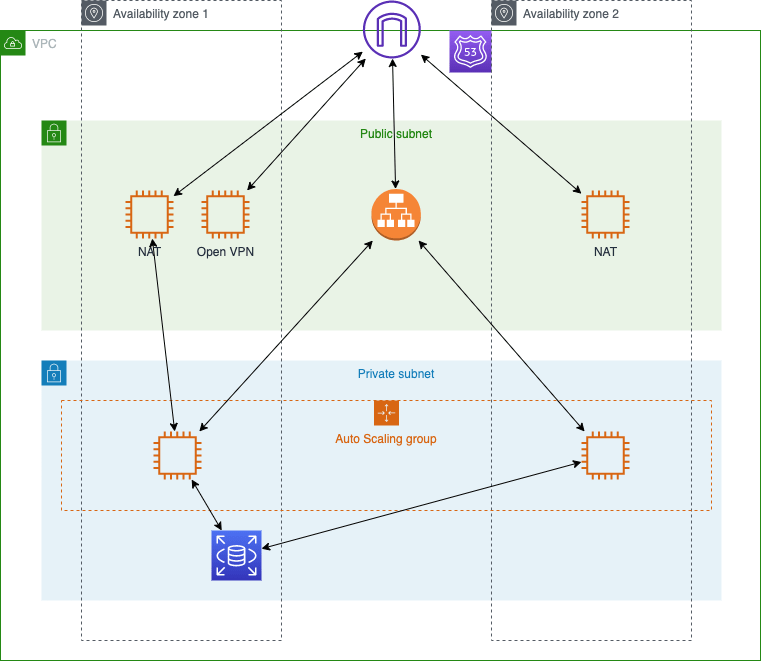
When configuring a typical VPC that’s going to use EC2 / ECS etc. I tend to go with something like this:
Subnets
I define just two subnets that span at least two availability zones. Anything that needs to be publicly accessible is placed in one of the public subnets otherwise everything else is placed in the private subnets. I used to create subnets for web servers and one for app servers and one for database but it just got to be overkill for my purposes. I’m sure in very large systems this makes a lot of sense to separate concerns and lock down access but over the top for me and my hosting needs. I simply name them as follows:
- Public Subnet AZ1
- Public Subnet AZ2
- Private Subnet AZ1
- Private Subnet AZ2
By default I turn off the public IP assignment of instances launched into all my subnets, including the public ones. I specify this each time I create specific instances and make use to elastic IP’s where applicable.
For internet updates and general web access for anything in the private subnets I route their traffic via a NAT server. This is especially important when using ECS as it needs the ability to communicate with the instances.
Security Groups
Layered on top of the subnets I tend to define the following security groups:
- Public Security Group
- Inbound:
- allow all public inbound traffic on ports 80 and 443 only.
- allow all traffic from within the VPC.
- Outbound:
- allow all outbound traffic.
- Inbound:
- Private Security Group
- Inbound:
- allow all traffic from within the VPC.
- Outbound:
- allow all outbound traffic.
- Inbound:
- NAT Security Group
- Inbound:
- allow all inbound VPC traffic on ports 80 and 443 only.
- allow all inbound VPC traffic on port 465 only (for sending email).
- allow all inbound VPC ICMP traffic.
- Outbound:
- allow all outbound traffic
- Inbound:
- DB Security Group
- Inbound:
- allow all inbound VPC TCP traffic on port 3306 only (MySQL).
- Outbound:
- allow all outbound traffic
- Inbound:
- VPN Security Group:
- Inbound:
- allow all inbound UDP traffic on port 1194 only.
- allow all inbound TCP traffic on port 443 only.
- Outbound:
- allow all outbound traffic
- Inbound:
Route 53
When using AWS services it makes no sense to handle your DNS anywhere else. Everything just works and it’s built by AWS for AWS. Super simple to setup your domain in Route 53 and change your name servers with your registrar. You then have tons of control to setup alias records that point directly to your resources without having to even worry about IP addresses etc.
Certificate Manager
One of the great things AWS offers are “free” SSL certificates. The only caveat (hence the “free”) is that you simply pay for the resources the certificates are attached to (Load Balancer, CDN etc.). I don’t see this as a catch because for most applications running on EC2 you’re more than likely going to be using an application load balancer anyway. Using Route 53 just makes life very simple to validate the domain and I’ve had certificates issued within minutes. Highly recommend using this service.
EC2
The only non-ecs instances I have setup are:
- OpenVPN – to provide me access into the VPC
- NAT Servers – to provide NAT routing for any instances in the private subnets.
Both these instance types can be started from community and marketplace AMI’s. Everything else tends to be controlled by ECS and the auto-scaling groups.
OpenVPN
It’s good practice to keep everything locked down and in the private space so there is a limited security exposure. However, in order to access these instances you need to connect to the VPC through a VPN and there are two ways to do this:
- AWS VPN
- AWS’s own fully managed VPN service
- OpenVPN
- Popular open-source VPN software offered via the AWS Marketplace.
For personal hosting, or for small businesses that only need up to 2 connections, OpenVPN provides a great solution. Setup is really simple and as long as you’re ok with a self signing certificate then this is all you really need.
From a cost perspective it’s dirt cheap because I’m not on the VPN all day every day. When I need to connect, I simply login into my AWS console and start up the VPN instance (currently on a t3.nano instance type). When I’m done I just stop the instance. I have an elastic IP associated with the instance so I don’t need to worry about it resetting each time.
If you have more folks that need access to the VPN then I would probably recommend looking at the AWS VPN service offering.
Application Load Balancers
I want all my applications to be running on HTTPS and take advantage of being deployed on multiple instances. When traffic starts to climb I also want a reliable way to scale so the easiest way to do that is to put them all behind an Application Load Balancer. I configure the LB with certificates (from certificate manager) and define rules to forward traffic to instances and/or target groups.
I’ve moved all my applications and websites to use Docker (on ECS) and configured the LB with host rules to forward to the various target groups. For what I’m doing (at the time of writing) a single LB is more than sufficient but provides a super simple upgrade path to split it out when and if traffic becomes large enough.
ECS / ECR
As mentioned above, I moved all my apps to Docker and deploy them using ECS. It forces me to think about what I really need and helps me lock everything down. I rely heavily on environment variables to ensure I’m not storing any sensitive information in my git repos and task definitions make configuring this super easy. Certainly improved how I think about deployment into production environments!
RDS (MySQL)
I have a MySQL RDS instance that runs some small WordPress sites and applications (that require a database). At the time of writing a db.t3.micro instance is running and handling the load just fine.
The other great thing about using a service like RDS is that I wanted to update the instance to a newer type. There were two paths I could have chosen a) update the current instance or b) spool up a new one and restore databases. I ended up choosing the latter and it was quite painless. Figured it was better to start from scratch and keep everything clean.
I obviously needed to change the connection strings for all my apps but because I’m running Docker it was a super simple and painless experience. I simply updated the environment variables in each of the corresponding task definitions and spooled up new tasks for each service. Worked like a charm. I was then able to stop the old RDS instance to ensure everything was working properly.
Cloud Formation
Once thing I 100% recommend is to script your infrastructure out using Cloud Formation. If you’re creating services in AWS then think in terms of your ability to stand up an application environment, test it and then tear it down when you’re not using it. It not only forces you to think about what resources you really need but saves a ton of money because you don’t need a test environment running when you’re not using it.
Conclusion
For a typical VPC that uses ECS / EC2 this scheme works great. Public and private resources are separated and locked down and security groups provide the necessary access control. Creation of instances is orchestrated behind the scenes by ECS so we really don’t have to manage instances individually.
As a side note, I’ve been exploring Serverless recently so we’ll see how this holds up over time 🙂
 PJD Hub